Overview
Muen is an Open Source separation kernel (SK) for the Intel x86/64 architecture that has been formally proven to contain no runtime errors at the source code level. It is developed in Switzerland by codelabs GmbH. Muen was designed specifically to meet the challenging requirements of high-assurance systems on the Intel x86/64 platform. To ensure Muen is suitable for highly critical systems and advanced national security platforms, codelabs closely cooperates with the high-security specialist secunet Security Networks AG in Germany.
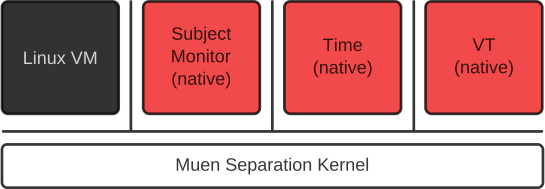
A separation kernel is a specialized microkernel that provides an execution environment for components that exclusively communicate according to a given security policy and are otherwise strictly isolated from each other. The covert channel problem, largely ignored by other platforms, is addressed explicitly by these kernels. SKs are generally more static and smaller than dynamic microkernels, which minimizes the possibility of kernel failure, enables the application of formal verification techniques and the mitigation of covert channels.
Muen uses Intel’s hardware-assisted virtualization technology VT-x as core mechanism to separate components. The kernel executes in VMX root mode, while user components, so called subjects, run in VMX non-root mode. Hardware passthrough is realized using Intel’s VT-d DMA and interrupt remapping technology. This enables the secure assignment of PCI devices to subjects.
| Muen is under active development and verification of kernel properties is ongoing. |
Features
Kernel
The following list outlines the most-prominent features of the Muen kernel:
-
Minimal SK for the Intel x86/64 architecture written in SPARK 2014
-
Full availability of source code and documentation
-
Proof of absence of runtime errors
-
Multicore support
-
Nested paging (EPT) and memory typing (PAT)
-
Fixed cyclic scheduling using Intel VMX preemption timer
-
Static assignment of resources according to system policy
-
PCI device passthrough using Intel VT-d (DMAR and IR)
-
PCI config space emulation
-
Support for Message Signaled Interrupts (MSI)
-
Minimal Zero-Footprint Run-Time (RTS)
-
Event mechanism
-
Shared memory channels for inter-subject communication
-
Crash Audit
-
Support for 64-bit native and 32/64-bit VM subjects
-
Native 64-bit Ada subjects
-
Native 64-bit SPARK 2014 subjects
-
Linux 32/64-bit VMs
-
SMP for Linux VMs
-
MirageOS unikernels [mirageos]
-
Tau0
Tau0 (τ₀) is the Muen System Composer. In its current static mode of operation, the task of Tau0 is to compose a system image while making sure that certain invariants are not violated. The Tau0 concept is a mechanism to gradually increase the flexibility of component-based systems running on top of Muen, while keeping a high level of assurance regarding the correctness of isolation enforcement. Read more about Tau0 here.
Components
The Muen platform includes re-usable components which implement common services:
-
AHCI (SATA) driver subject written in SPARK 2014
-
NVMe driver subject written in SPARK 2014 (experimental)
-
Device Manager (DM) written in SPARK 2014
-
Subject Monitor (SM) written in SPARK 2014
-
Subject Loader (SL) written in SPARK 2014
-
Subject Lifecycle Controller written in SPARK 2014
-
Timeserver subject written in SPARK 2014
-
Debugserver subject written in Ada 2012
-
PS/2 driver subject written in Ada 2012
-
Virtual Terminal (VT) subject written in Ada 2012
Furthermore the [muenblock], [muenevents], [muenfs] and [muennet] Linux kernel modules provide block I/O, inter-subject event, virtual filesystem and network interface drivers based on inter-subject memory channels.
Toolchain
The Muen platform includes a versatile toolchain which facilitates the specification and construction of component-based systems in different application domains.
The [mugenhwcfg] tool for automated hardware description generation simplifies the addition of support for new target machines. There is also a Debian Live-based bootable image [mugenhwcfg-live] with persistence to simplify the collection of hardware configurations from new targets.
Resources
Documentation
The following detailed project documentation is available:
-
Muen System Specification
https://muen.sk/muen-system-spec.pdf -
Muen Kernel Specification
https://muen.sk/muen-kernel-spec.pdf -
Muen Component Specification
https://muen.sk/muen-component-spec.pdf -
Bootloader Signed Block Stream of Commands Specification
https://muen.sk/bsbsc-spec.pdf -
Original Muen master thesis
https://muen.sk/muen-report.pdf -
Muen project presentation
https://muen.sk/muen-slides.pdf -
Presentation given at High Integrity Software Conference HIS 2014
http://www.slideshare.net/AdaCore/slides-his-2014secunethsr -
Technical articles on Muen
https://muen.sk/articles.html
Mailing list
The muen-dev@googlegroups.com mailing list is used for project announcements and discussions regarding the Muen separation kernel.
-
To subscribe to the list, send a (blank) mail to muen-dev+subscribe@googlegroups.com. Note: A Google account is not required, any email address should work.
-
To post a message to the list write an email to muen-dev@googlegroups.com.
-
The list has a Google Groups web interface: https://groups.google.com/group/muen-dev.
Tested Hardware
The following hardware is used for the development of Muen. There is a good chance similar hardware works out-of-the box if the microarchitecture is Ivy Bridge or newer.
Intel x86
ASUS Prime Z690-P D4 |
Alder Lake |
i5-125000 |
iBASE MI995VF-X27 |
Coffee Lake |
Xeon E-2176M |
Lenovo ThinkPad T480s |
Kaby Lake |
i7-8650U |
HPE DL380 Gen10 Server |
Skylake |
Xeon Gold 6130 |
Lenovo ThinkPad X260 |
Skylake |
i7-6500U |
Intel NUC 6i7KYK |
Skylake |
i7-6770HQ |
UP2 maker board |
Apollo Lake |
Atom E3950 |
Intel NUC 6CAYH |
Apollo Lake |
Celeron J3455 |
Intel NUC 5i5MYHE |
Broadwell |
i5-5300U |
Cirrus7 Nimbus |
Haswell |
i7-4765T |
Lenovo ThinkPad T440s |
Haswell |
i7-4600U |
Lenovo ThinkPad T430s |
Ivy Bridge |
i7-3520M |
Kontron Technology KTQM77/mITX |
Ivy Bridge |
i7-3610QE |
Building Muen
Prerequisites
Muen is built using the Bob Build Tool [bob], install it via pipx:
$ pipx install BobBuildTool
Further variants of installing bob are described here: https://bob-build-tool.readthedocs.io/en/latest/installation.html#install.
We recommend using the following bob user configuration in
~/.config/bob/default.yaml:
command:
  dev:
    jobs: 32
    sandbox: dev
Replace the example number 32 with your desired job count (e.g. number of CPU
cores of your build machine). The sandbox: dev setting instructs bob to build
in a containerized environment.
Once bob is ready, clone the Muen recipes and update all layers:
$ git clone --recurse-submodules https://git.codelabs.ch/bob/muen.git
$ cd muen
$ bob layers update
Deployment & Testing
Emulation
To ease kernel development and testing, the Muen project makes use of nested virtualization provided by QEMU/KVM.
Issue the following command in the project directory to start the Muen system in QEMU:
$ contrib/runQemu.py -q x86-qemu-debug
The system serial output is written to run/serial.out. Follow the on-screen
instructions on how to connect to the QEMU vnc session or how to SSH into the
NIC Linux guest VM of the demo system.
| As the virtual terminal (VT) over curses is timing sensitive and QEMU/KVM cannot guarantee correct timing due to differences in host CPU, system load, etc., this console is just an emergency console. Use SSH to interact with the booted Muen system. |
To run an ARM64 system execute contrib/runQemu.py with an arm64-specific
package query:
$ contrib/runQemu.py -q arm64-qemu-zcu102-minimal-debug
It’s also possible to run all virtualized scenarios via the continuous integration (CI) system:
$ ci/run.sh -a output
This will build and test all QEMU-emulated systems automatically, writing all
artifacts to the given output directory. To put a specific system under test:
$ ci/run.sh -a output -r x86-qemu-debug
See ci/run.sh -h for all available options.
Hardware
To build a bootable ISO file, execute the following command:
$ bob dev x86-t430s-debug
This will build a system for the Lenovo T430s hardware which can be dumped on a
USB stick. If the desired system is not already present when executing the bob
ls command, add it to the x86.yaml recipe accordingly (use the entry for the
Lenovo T430s hardware as a template).
To build the minimal demo for the Xilinx MPSoC execute:
$ bob dev arm64-xilinx-zcu104-minimal-debug
Then copy dev/dist/arm64-xilinx-zcu104-minimal-debug/1/workspace/BOOT.bin to
a suitable SD card and power on the board.
References
-
Bob Build Tool, https://bobbuildtool.dev/
-
MirageOS, https://mirage.io
-
Muenblock Linux kernel module, https://git.codelabs.ch/?p=muen/linux/muenblock.git
-
Muenevents Linux kernel module, https://git.codelabs.ch/?p=muen/linux/muenevents.git
-
Muenfs Linux kernel module, https://git.codelabs.ch/?p=muen/linux/muenfs.git
-
Muennet Linux kernel module, https://git.codelabs.ch/?p=muen/linux/muennet.git
-
Muen hardware config generator, https://git.codelabs.ch/?p=muen/mugenhwcfg.git
-
Mugenhwcfg Live, https://github.com/codelabs-ch/mugenhwcfg-live/releases
License
Unless otherwise noted, this project and its sub-projects are licensed under
the GNU General Public License v3.0 (GPLv3) or (at your option) any later
version.

Specific libraries are licensed under the BSD License to provide additional
flexibility for commercial use. Furthermore, the interfaces between the kernel
and subjects (virtual machines / user programs) constitute GPL boundaries.

For authoritative information, please consult the file headers and any COPYING
files within each sub-project.